 By theo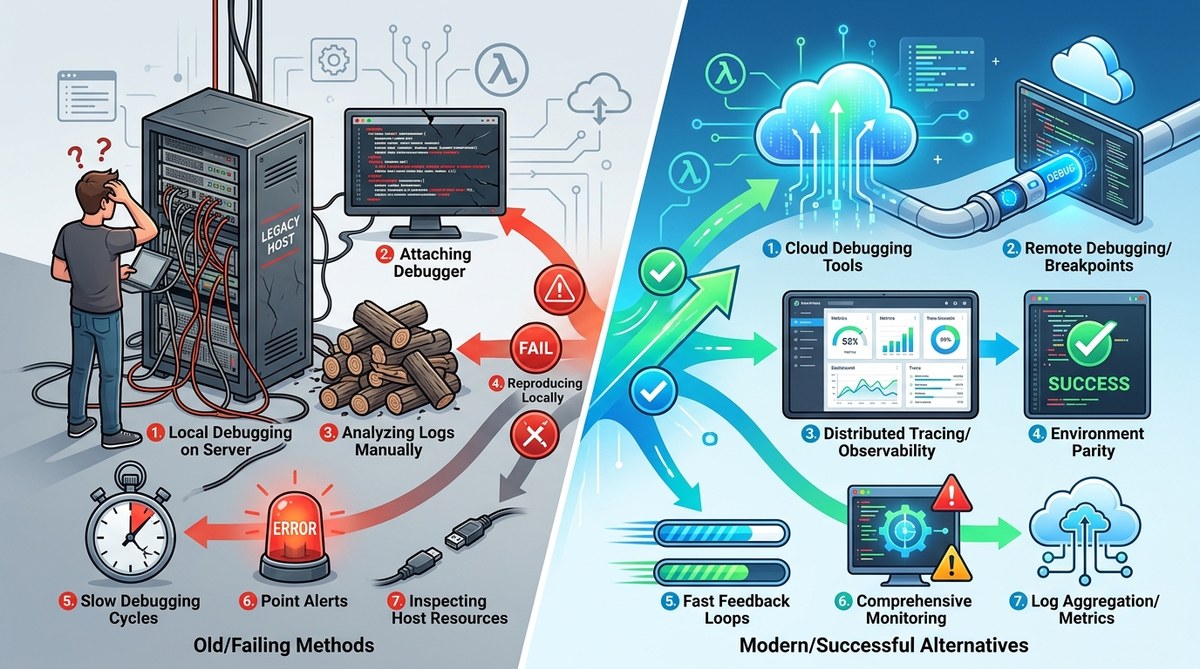
Your Lambda function returned a 500. The logs show a timeout. You add a console.log statement, redeploy, and wait. The next invocation works, but you still have no idea what caused the original failure. This cycle feels familiar to anyone who has tried to debug serverless functions using patterns that worked fine on a monolith. The problem is not you. The problem is that traditional debugging patterns assume a persistent runtime where you can attach a debugger, inspect memory, and step through code. Serverless environments do not give you that luxury. They are stateless, ephemeral, and highly distributed. If you keep using the same old techniques, you will waste hours and learn very little.
Seven common debugging patterns fail in serverless: relying on local emulators, using print statements as the sole method, ignoring cold starts, skipping structured logging, treating all errors as transient, debugging without distributed tracing, and assuming synchronous execution. Replace them with structured logging, distributed tracing, canary deployments, and proper error classification.
The Seven Patterns That Let You Down
Serverless platforms like AWS Lambda, Azure Functions, and GCP Cloud Functions share a set of constraints. They spin up on demand, run for a limited time, and share no state between invocations. These constraints make seven popular debugging approaches almost useless.
1. Relying on local emulators
Local emulators like SAM or LocalStack are great for catching syntax errors. They fail you when you need to reproduce production behavior. Emulators do not replicate the real cold start latency, the actual IAM permissions, or the network topology of your cloud environment. You might spend an afternoon debugging a timeout that only happens when your function waits for a database connection pool to warm up.
2. Using print statements as your only log
Console logs work fine on a laptop. In serverless, they are often the first thing to disappear. Logs from ephemeral containers can be truncated, lost during a crash, or simply not flushed before the runtime shuts down. Relying on print statements is like trying to debug a car engine by listening to it from the sidewalk.
3. Ignoring cold starts
Cold starts happen when a function instance is created from scratch. They add latency and can expose race conditions that never appear during warm invocations. If you only test with warm functions, you will miss errors related to initialization, credential rotation, or connection pooling.
4. Skipping structured logging
Printing a plain string might tell you that an error happened. It will not tell you which user triggered it, what the request payload was, or how long each step took. Without structured logs, you are left guessing.
5. Treating all errors as transient
Some errors in serverless are truly transient. A downstream API might return a 503 for a few milliseconds. Other errors are permanent and indicate a bug in your code. If you treat every error the same way, you will either retry forever or silently drop critical failures.
6. Debugging without distributed tracing
A single user request might trigger multiple Lambda functions, a queue, a database, and an external API. Without a trace ID that follows the request across services, you cannot connect the dots between a slow database query and a user timeout.
7. Assuming synchronous execution
Serverless functions often run in parallel. A function that processes a queue item might have multiple instances running at the same time. If your debugging approach assumes a single thread, you will miss race conditions and deadlocks.
What to Use Instead
The table below maps each failed pattern to a modern replacement.
| Failed pattern | Modern replacement | Why it works |
|---|---|---|
| Local emulators | Canary deployments with real traffic | Real environment, real permissions |
| Print statements | Structured logging with a schema | Logs survive crashes, easy to query |
| Ignoring cold starts | Prewarming and cold start testing | Catches initialization bugs |
| Plain text logging | JSON structured logs | Enables filtering and aggregation |
| Treating all errors as transient | Error classification with severity levels | Correct retry vs. alert behavior |
| No distributed tracing | OpenTelemetry or AWS X-Ray | End to end visibility |
| Assuming synchronous execution | Idempotency keys and concurrent testing | Catches race conditions |
A Practical Process for Debugging Serverless Functions
Here is a numbered process that works for AWS Lambda, Azure Functions, and GCP Cloud Functions.
-
Add structured logging first. Before you do anything else, instrument your function with a logging library that outputs JSON. Include the request ID, the function version, and a correlation ID that you can pass to downstream services. This step alone will save you hours.
-
Set up distributed tracing. Use OpenTelemetry or the platform specific tracing tool. Configure it to send trace data to a backend like Honeycomb, Datadog, or the cloud provider’s own console. Traces show you where time is spent and which services fail.
-
Classify errors by severity. Define three categories: transient, permanent, and unknown. Transient errors should trigger a retry with exponential backoff. Permanent errors should be logged and alerted. Unknown errors should be escalated for manual review.
-
Deploy a canary change. Instead of testing locally, deploy your change to a small percentage of traffic. Monitor the structured logs and traces for anomalies. If you see a spike in errors, roll back immediately.
-
Reproduce cold starts on demand. Most cloud providers offer a way to force a cold start. In AWS, you can update the function code to clear the instance pool. In Azure, you can scale the function to zero and back up. Use this to test initialization logic.
-
Write idempotent handlers. Because multiple instances can process the same event, your handler must be safe to run more than once. Use idempotency keys in your database or queue to prevent duplicate processing.
-
Review your error budget. Track how many errors you accept in production. If your error rate exceeds the budget, stop shipping new features and fix the root cause.
Why Local Debugging Gives You False Confidence
Local emulators are tempting because they are fast. You can run your function, inspect variables, and see results in seconds. The problem is that they simulate a world that does not exist. Real serverless functions run behind a cloud provider’s load balancer, with real authentication, real rate limiting, and real network latency. A bug that only appears when your function is invoked 100 times per second will never show up in your local environment.
Expert advice: “Stop treating local emulators as a debugging tool. Use them only for syntax validation and unit tests. Debugging must happen in an environment that mirrors production as closely as possible.”
Instead of spending time on local debugging, invest in a robust staging environment that mirrors your production setup. Use the same runtime version, the same memory allocation, and the same timeout settings. If you cannot afford a full staging environment, use canary deployments to test changes on a small subset of traffic.
Tools That Actually Help
Here is a bulleted list of tools that align with the modern patterns described above.
- OpenTelemetry SDK for distributed tracing across any cloud provider
- AWS X-Ray for tracing Lambda functions and downstream services
- Azure Application Insights for Azure Functions monitoring
- GCP Cloud Logging with structured JSON payloads
- Datadog Serverless for log aggregation and trace correlation
- Honeycomb for high cardinality event inspection
- Sentry for error tracking with severity classification
- Apex Functions for canary deployments and traffic splitting
Each of these tools supports the patterns that work in serverless. They give you visibility without requiring you to attach a debugger.
How to Debug Asynchronous Errors
Serverless functions often involve asynchronous operations like calling an external API, writing to a queue, or updating a database. These operations can fail silently. To debug them, follow these steps.
First, ensure every async call has a timeout. A default timeout of 30 seconds might hide a slow API. Set a shorter timeout and log the response time. Second, use a correlation ID that you pass to every downstream service. If the external API fails, you can trace the failure back to the original request. Third, log the full payload and response for every async call. This data is invaluable when you need to reproduce a failure.
For more on this topic, check out our guide on how to debug asynchronous JavaScript errors without losing your sanity. It covers patterns that apply to any runtime, not just JavaScript.
Moving Beyond the Debugging Habits That Hold You Back
The patterns you learned on a monolith are not wrong. They are just incomplete for serverless. The shift from persistent servers to ephemeral functions requires a different mindset. You need to accept that you cannot attach a debugger. You cannot step through code line by line. You cannot rely on a local environment to tell you the truth.
Instead, you must build observability into your functions from the start. Structured logging, distributed tracing, and error classification are not optional. They are the foundation of serverless debugging. If you skip them, you will spend your time guessing.
Start with one change. Add structured logging to your most critical function. Deploy it, monitor the logs, and see how much more you understand about what your code is actually doing. Then add tracing. Then classify your errors. Each step will reduce the time you spend on debugging and increase the time you spend on building.
You already have the skills to debug complex systems. You just need to apply them through the right patterns. Replace the old habits with these modern alternatives, and your serverless debugging will become a structured process instead of a guessing game.