 By theo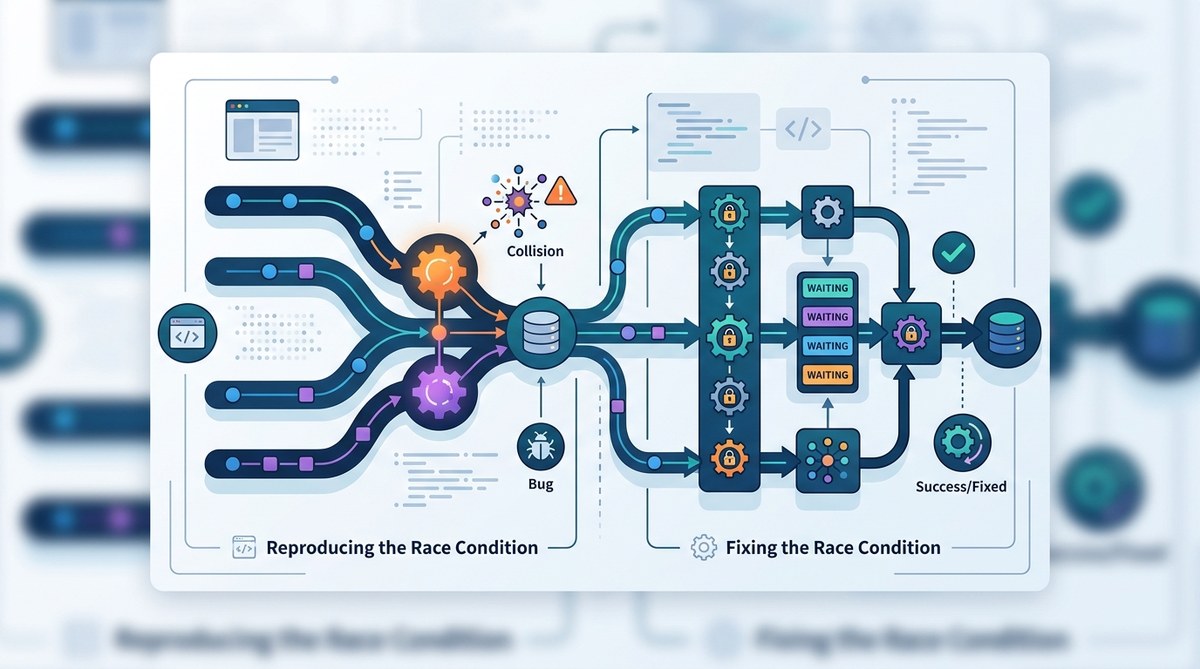
Race conditions in JavaScript can turn a smooth application into a buggy mess. You write code that looks correct. You test it locally. It works. Then in production, under load, things break. Users see stale data, flickering UI, or silent failures. The root cause? Two asynchronous operations competing for the same resource, and the timing is off. Let’s fix that.
JavaScript race conditions happen when async operations overlap unpredictably. To reproduce them, introduce artificial delays or race multiple requests. Fix them by using locks, cancellation tokens, or state checks. The best fix is designing your async flow to be deterministic. This guide walks you through three common patterns and gives you code you can use right now.
Understanding the Problem
A race condition in JavaScript is a timing bug. Two or more async operations (like fetch calls, setTimeout callbacks, or promise chains) modify a shared value. The final result depends on which operation finishes last. That order can change between runs.
In single-threaded JavaScript, you still face race conditions with async code. The event loop interleaves tasks. A promise callback might run between two synchronous statements. Here is a classic example:
let userData = null;

async function fetchUser(userId) {
  const response = await fetch(`/users/${userId}`);
  userData = await response.json();
}

// Two calls fired in sequence
fetchUser(1);
fetchUser(2);

// At some point, userData will be overwritten
The second call might resolve before the first. Or the first could finish later. The result is unpredictable.
Three Ways to Reproduce Race Conditions
You need to see the bug before you can squash it. Here is a step-by-step process to reproduce race conditions in your own code.
-
Isolate the shared resource. Identify any variable, DOM element, or API response that multiple async functions read or write. In a React component, that could be a state variable updated by two useEffect calls.
-
Add artificial delays. Use
setTimeoutor a wrapper that pauses a promise for a random number of milliseconds. This simulates network jitter.
javascript

   function delayedResolve(value, ms = Math.random() * 1000) {

     return new Promise(resolve => setTimeout(() => resolve(value), ms));

   }
- Fire overlapping operations. Call your functions without
awaitor inside a loop that triggers them simultaneously. Then log the final state of the shared resource.
let sharedArray = [];

async function update(id) {
  const data = await delayedResolve(id);
  sharedArray.push(data);
}

// Run 10 updates without waiting for each to finish
for (let i = 0; i < 10; i++) {
  update(i);
}

// Check later: sharedArray length is not always 10
If you see missing items or wrong values, you have a race condition.
Common Patterns and Fixes
We will look at three patterns. Each comes with a recommended fix.
Pattern 1: Uncontrolled Overlapping Requests
This happens often with typeahead search, infinite scroll, or any feature that makes a request on every user event. Old responses can overwrite newer ones.
Table of techniques and their tradeoffs
| Technique | How it works | Best for | Downside |
|---|---|---|---|
| Request cancellation | Abort a previous in-flight request when a new one starts | User-triggered fetches (autocomplete, pagination) | Requires AbortController API support |
| Debouncing/Throttling | Delay execution so that only the last event fires | High-frequency events (keystrokes, scroll) | Adds artificial latency |
| Sequence guard | Track the last initiated request ID and ignore stale responses | Any async operation with sequential dependencies | Requires state management overhead |
Fix with AbortController:
let currentController;

async function search(query) {
  if (currentController) {
    currentController.abort();
  }
  currentController = new AbortController();
  try {
    const response = await fetch(`/search?q=${query}`, { signal: currentController.signal });
    const results = await response.json();
    // update UI
  } catch (err) {
    if (err.name === 'AbortError') return; // expected
    throw err;
  }
}
Pattern 2: Shared State Updates Without Locking
When multiple async functions write to the same array or object, you need coordination.
Numbered steps to fix:
- Determine if the operations can be serialized. If yes, use a queue.
- Build a simple mutex using a promise chain.
- Replace direct mutation with operations inside the mutex.
class Mutex {
  constructor() {
    this._queue = [];
    this._locked = false;
  }

  acquire() {
    return new Promise(resolve => {
      this._queue.push(resolve);
      if (!this._locked) {
        this._locked = true;
        this._queue.shift()();
      }
    });
  }

  release() {
    if (this._queue.length > 0) {
      this._queue.shift()();
    } else {
      this._locked = false;
    }
  }
}

// Usage
const mutex = new Mutex();
let transactions = [];

async function addTransaction(tx) {
  await mutex.acquire();
  try {
    transactions.push(tx);
  } finally {
    mutex.release();
  }
}
Expert tip: A mutex helps, but it can become a bottleneck. For high-throughput scenarios, consider using a single producer-consumer queue or a transactional database instead of in-memory state.
Pattern 3: Race Conditions in Event Listeners
DOM events fire asynchronously. Two handlers attached to different events can conflict when they both update the same element.
Bulleted list of prevention strategies:
- Use a flag to indicate the current operation state (e.g.,
isLoading). - Debounce the event handler if the user can trigger it repeatedly.
- Remove event listeners after they are no longer needed.
Example with a state flag:
let isLoading = false;

button.addEventListener('click', async () => {
  if (isLoading) return;
  isLoading = true;
  try {
    await saveData();
  } finally {
    isLoading = false;
  }
});
Debugging Race Conditions in Practice
Reproducing the bug is half the battle. Debugging a race condition often requires more than a breakpoint. Here are tools and techniques.
- Add timestamp logging. Log the start and end of each async operation with
Date.now(). Compare the order in production logs. - Use
Promise.raceto force interleaving. You can test your fix by racing your function against a random delay. - Leverage browser DevTools. Chrome’s Performance tab lets you record a user flow and see task boundaries. Firefox has a similar tool.
If your app is a React frontend, look for state updates inside useEffect that depend on the same state. A common mistake is to have two effects with different dependencies that both call setState based on the same resource. Our guide on mastering debugging strategies for frontend JavaScript errors covers this scenario in more depth.
When to Use Async Locks vs Request Cancellation
Not every race condition needs a full mutex. Here’s a simple decision matrix:
| Scenario | Recommended approach |
|---|---|
| One-shot user action that can repeat (search, filter) | Request cancellation (AbortController) |
| Multiple async writes to the same data structure | Mutex or queue |
| Background sync or periodic polling | Debounce last request, ignore overlapping results |
| Third-party API with no cancellation support | Sequence guard with a request ID counter |
Writing Tests That Catch Race Conditions
Unit tests often pass because they run synchronously. To catch racing, you need to replicate the nondeterminism.
// Helper to create a race test
async function testRace(fn, iterations = 100) {
  const results = new Set();
  for (let i = 0; i < iterations; i++) {
    await fn();
    // Check invariant after each iteration
  }
}
Use Promise.all to fire multiple async operations simultaneously inside your test. Then assert that the final state is consistent.
Avoiding Race Conditions at the Architecture Level
The most reliable fix is to remove the shared mutable state. Consider these architectural changes:
- Use immutable data stores (Redux, Zustand) with reducers that process actions sequentially.
- Keep state inside a single source of truth like a database and let the backend handle concurrency.
- Use streams or observables (RxJS) to manage async flows declaratively.
For Node.js applications, watch out for race conditions in file I/O or database writes. If your server processes requests in parallel, a shared global counter can produce wrong results. A mutex or a database transaction is safer.
If you are dealing with memory leaks that worsen race condition symptoms, check our article on diagnosing and fixing memory leaks in web applications. Memory pressure can cause garbage collection to run at unexpected times, delaying promise resolutions and altering timing.
Summary of Key Techniques
- Reproduce race conditions by adding artificial delays and running operations concurrently.
- Fix them with cancellation, mutexes, or state flags.
- Test under simulated network jitter and high concurrency.
- Prefer architectural solutions that eliminate shared mutable state.
Remember that JavaScript race conditions are not a sign of a broken language. They are a symptom of uncontrolled concurrency. With the right patterns, you can make your async code predictable and reliable. Try the mutex example above in your next project. It will save you hours of debugging down the road.